
Create, correct and save a rooftop location reference
Create a location reference in an existing project, inspect an indoor/outdoor mismatch, correct it with Describe and Edit, then reload to verify the saved image. Includes exact inputs, before-and-after evidence and the actual two-credit cost.
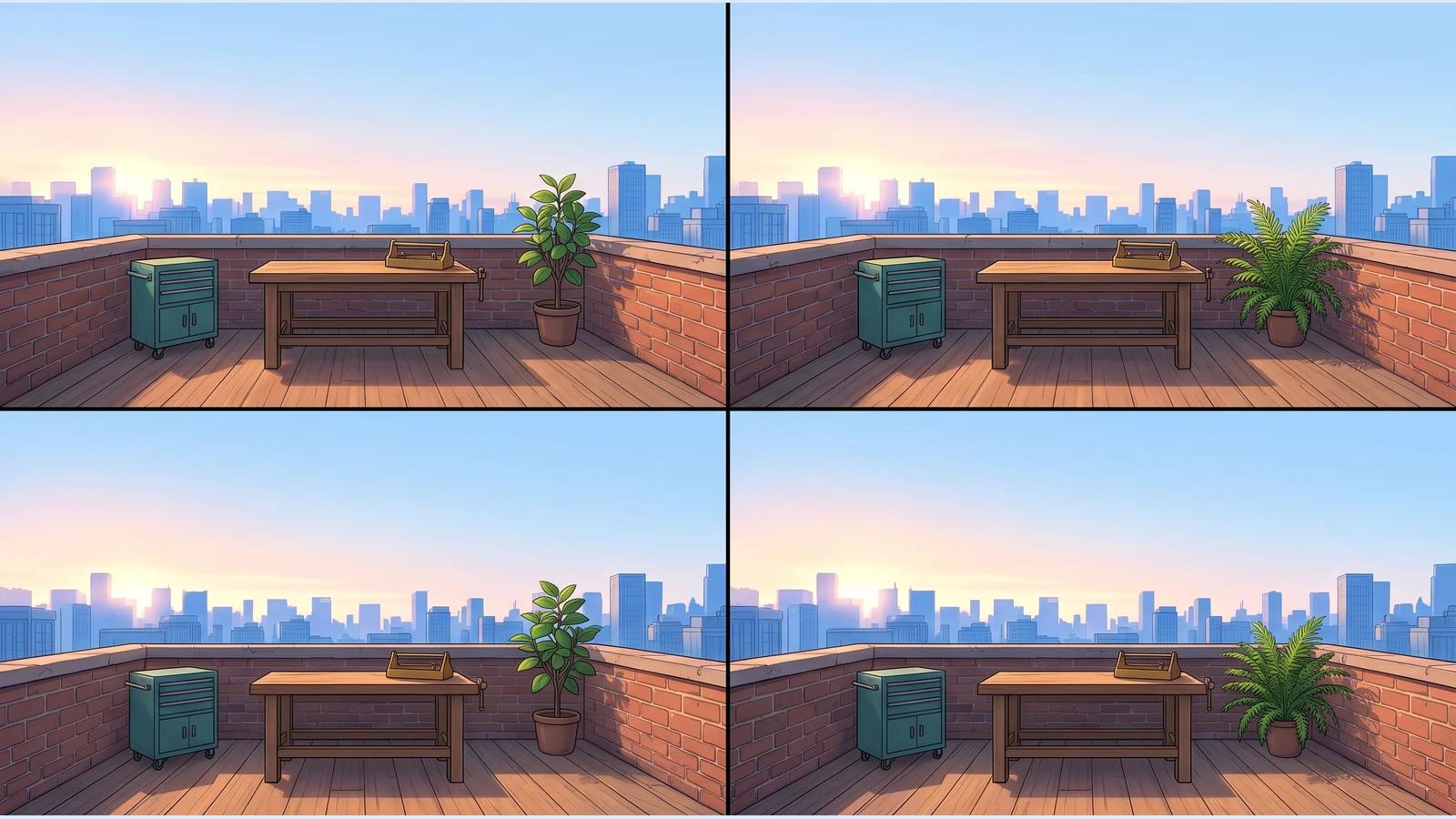
A location reference gives you a saved visual starting point for an anime setting. In this walkthrough, we added Sunrise Rooftop Workshop to an existing C2Anime project, checked the first image, corrected an indoor/outdoor mismatch with Describe → Edit, and reopened the saved result.
This is a location-reference workflow. We did not generate a new scene or video, and we have not tested how this reference affects a later render.
Before you start
Sign in at Create and open a story you already own. We used Kiko and the Brass Bird, with its previously saved Kiko character and brass bird item. Those earlier assets and the old video are prerequisites visible in the workspace, not results created for this tutorial.
The project uses Japanese Anime style. The New dialog said its reference image would be drawn in the anime style for 1 credit. It did not expose a model or aspect-ratio selector. The video controls behind the dialog belong to video generation; they were not location-image settings.
Step 1 — Open the project's reference collection

From Create, open Show story history, select your story, then choose Characters → Add → New. Despite the Characters label, New also supports Location and Item references.
Step 2 — Choose Location and describe the setting

We selected Location, entered the name Sunrise Rooftop Workshop, and used this exact description:
A quiet open-air rooftop workshop at sunrise, Japanese anime background art. One sturdy wooden workbench stands in the center, with a small brass tool tray and a neat row of hand tools on the back edge. A low red-brick parapet surrounds the roof. On the left is a compact teal metal storage cabinet; on the right is a single potted green plant. Warm golden morning light comes from the left, with a soft blue city skyline in the distance. Eye-level wide view, clear uncluttered floor space in front of the workbench. Empty location only: no people, no animals, no birds, no text or logos.
No reference photo or sketch was uploaded. We clicked Create once. The dialog closed automatically, the location appeared in the project, and its image continued generating. We waited for Location ready; no second Confirm click was needed in this run.
Step 3 — Inspect the first result before accepting it

The first image was a four-panel reference sheet of an enclosed indoor workshop. It did not satisfy the open-air rooftop requirement. The card's name and saved description alone were not enough to prove the picture matched.
We selected the new location and opened its image. At this point the balance had changed from 827 to 826 credits. We kept this image as evidence and corrected the same asset through the product UI.
Step 4 — Correct the same image with Describe and Edit

In the image editor, we chose Describe, kept Edit selected, and submitted this exact correction:
Correct this location reference: it must be an OPEN-AIR ROOFTOP, not an indoor room. In every panel, remove all ceilings, roof beams, tall walls, arched windows, doors, clocks and fireplaces; show unobstructed pale-blue sky above a LOW red-brick parapet and a distant blue city skyline. Keep the warm sunrise anime illustration style. Show one simple central wooden workbench with a brass tool tray, a compact TEAL cabinet on the LEFT and one green potted plant on the RIGHT, with clear open floor space. No people, animals, birds, labels or text.
We clicked Generate once and kept the editor open while it worked. Edit displayed a cost of 1 credit. We did not use Redraw or create a second location.

When Updated — this is the new picture appeared, the picture showed open sky, a low brick parapet, a distant skyline, a teal cabinet on the left, a central wooden workbench and a plant on the right. We clicked Done.
Step 5 — Reload and reopen the saved location

We reloaded the page, returned to Characters, selected Sunrise Rooftop Workshop, and opened the image again. The corrected image, Location type, name and original description persisted. The final visible balance was 825 credits: 2 credits total for one creation and one image correction.
The older chat message still showed the first image. To inspect the current saved result, use the selected location card and its enlarged image rather than the old chat thumbnail.
The saved result and its limits

The final result is one 2752 × 1536 image containing four panels, not four separate scenes. The open-air setting and main left/center/right arrangement were achieved. Plants and framing vary between panels, and the requested neat row of hand tools is not clearly established. The first image was 1184 × 864, so the edit also changed the overall aspect ratio despite the editor's composition-preservation wording. We accepted this as a saved location reference, not an exact layout or continuity guarantee.
Open the full saved result image.
The location itself has no public project-editing page in this tested flow. To find your own result, sign in at Create, open the story through history, and go to Characters → your location. Creating and saving a reference does not prove it has been used by an existing rendered clip; this tutorial makes no such claim.
Phone check and practical caveats

We created and corrected the image at 1440 × 1000, then reopened the saved reference and full preview at 390 × 844. The enlarged image fit on the phone viewport. The surrounding creation workspace remains cramped: narrow panels can clip names and overlap controls. A Location card also uses the generic Supporting Character label; check the Location type instead.
Phone generation submission and a physical phone were not tested. For this run, the verified outcome is the saved and reopenable location image, with the first-result mismatch and the correction both documented.
A first like from an active subscriber gives a community author 1 credit. Likes are permanent; self-likes and repeat rewards are excluded.